Drawn by AppKit
Every node is a real view, not a div in a web page pretending to be one. Scrolling stays smooth because there is no document to reflow.
- AppKit
- NSView
- CoreGraphics
 Mernyx
Visual Mermaid, Natively
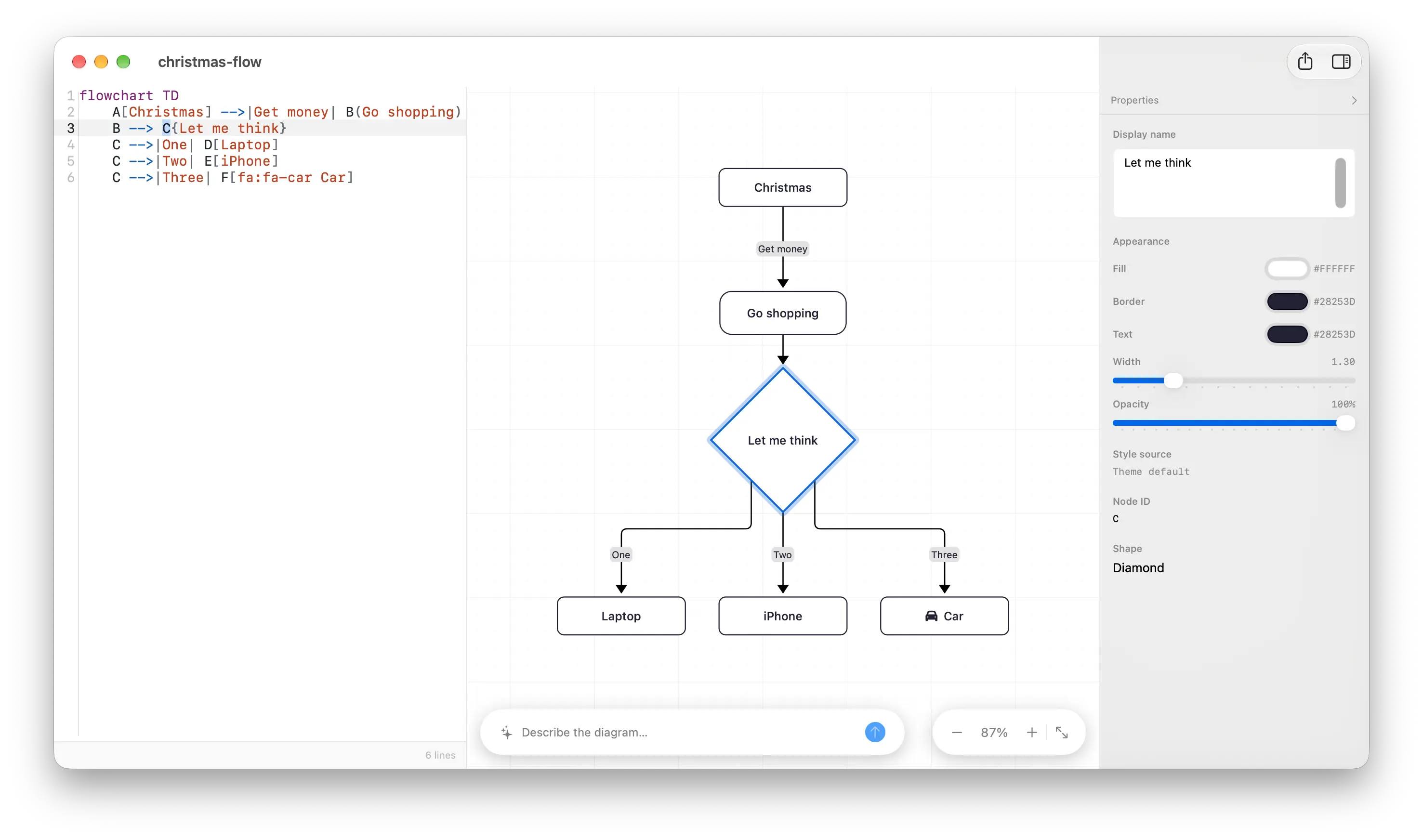
Move a node and the Mermaid source follows. Edit the text and the canvas recompiles.
01
Change a colour in the properties panel and the Mermaid source gains a style rule while the canvas redraws. None of the three is a picture of the others.
flowchart TD
    A[Christmas] -->|Get money| B(Go shopping)
    B --> C{Let me think}
    C -->|One| D[Laptop]
    C -->|Two| E[iPhone]
    C -->|Three| F[Car]
    style C color:#ffffff,fill:#F4431E
01
Add a node, connect two, drag an edge, paste. What the canvas writes is standard Mermaid — not a sidecar file, not a private format.
02
Fill, stroke, text colour, width and opacity become ordinary style rules, and the inspector says where the style came from.
03
Consecutive property edits merge into one text undo. ⌥⌘I tidies the document without touching comments or statement order.
02
Most Mermaid tooling is a browser wearing a desktop costume. Mernyx draws every node natively and resolves every layout natively.
Every node is a real view, not a div in a web page pretending to be one. Scrolling stays smooth because there is no document to reflow.
Geometry is computed by a dedicated layout engine, not laid out by a web view. Mernyx is not dependency-free — it is just not a browser.
Open any .mmd or .mermaid file from Finder. Preview it in place with Quick Look, and see thumbnails without launching anything.
03
Flowchart, sequence, class, state, ER, mindmap, C4, gantt, journey, kanban, xychart, ZenUML and 22 more — each with its own syntax-highlighting keyword table, its own layout, and its own editing rules.
Flowchart
Sequence diagram
Class diagram
State diagram
ER diagram
Mindmap
Architecture diagram
Requirement diagram
Block diagram
Swimlane diagram
Agent flow diagram
Use case diagram
Pie chart
Gantt chart
Quadrant chart
Radar chart
Treemap
Kanban diagram
Packet diagram
Info diagram
Timeline
Sankey diagram
User journey
Venn diagram
C4 diagram
Cynefin diagram
Git graph
XY chart
Wardley map
Railroad diagram
ZenUML diagram
Event modeling diagram
Ishikawa diagram
Tree view
Coverage means every family has a template that compiles to a non-empty scene. It does not mean every syntax and visual detail is finished.
Flowcharts are fully editable on the canvas. Other families support a growing subset — the capability matrix lists what each of the 34 can do, and in the app an action a family cannot do is not offered at all.
04
Mermaid spells an icon as fa:fa-user. GitHub’s Mermaid renderer draws those letters instead of the icon. Mernyx ships the Font Awesome Free glyphs, so the canvas shows the icon — and the exported SVG carries its outline rather than a font reference.
flowchart LR
  A([fa:fa-user User]) --> B([fa:fa-server Server])
  B --> C([fa:fa-database Database])
Font Awesome Free 7.3.1 ships inside Mernyx — 2,163 icons across the solid, regular and brands styles. Nothing to install and nothing to download: the glyphs are in the binary, and the file you export does not need them either.
The icon goes into the SVG as a path, not as a font name. Open that file on a machine with no Font Awesome Free installed and the icon is still there, scaling with the rest of the drawing.
A node can be the icon itself: @{ icon: “fa:user” } draws a frame around the glyph with the label on a band outside it. Same set, one more shape to reach for.
Both forms are Mermaid’s own — fa:fa-user in a label, @{ icon: … } on a node. Nothing Mernyx-specific to learn, and the file stays a plain .mmd.
05
Two entry points, both running on your own endpoint and your own key. The model only ever writes Mermaid source — Mernyx still compiles, lays out and draws it, and nothing reaches your file until you approve it.
Type into the bar at the bottom of the canvas. The Mermaid source streams into the editor and the canvas draws it while it is still arriving, so you can read every line before it lands. Mernyx compiles the result; if it does not parse, the errors go back to the model and it tries again. Your file stays untouched until you press Apply — and Apply is a single ⌘Z from undone.
When the source does not parse, the diagnostics bar offers Fix with AI. The broken file and its diagnostics go to your model, and what comes back is shown as a line diff first — so you see exactly what changed before you take it. Apply only appears when the error count actually went down, and that verdict comes from the engine, not from the model.
Point Mernyx at any OpenAI-compatible endpoint — OpenAI, OpenRouter, DeepSeek, Groq, Qwen, or a model running on this Mac through Ollama or LM Studio. The key lives in your macOS keychain and the request goes from your Mac to the provider you picked. Mernyx has no account and no server in the middle.
The model returns Mermaid source and nothing else. Layout, colours and shapes are still decided by Mernyx’s engine, so a generated diagram is drawn by the same renderer as one you drew by hand.
Both paths end in Apply or Discard. Discard never touches the document and never enters the undo stack; Apply replaces it in one step you can undo with ⌘Z.
AI generate and fix are part of Pro. On the free tier you can set the endpoint, the model and the key up front — they start working the moment Pro is unlocked.
Eight smaller things that never get a chapter of their own, and that you would miss the moment you stopped using them.
PNG, SVG and PDF, all produced from the same Scene rather than by round-tripping through a browser print dialog — though a few primitives still come out slightly differently in the raster exports.
⌥⌘I normalises whitespace and flowchart block indentation without touching token content, comments or statement order.
Put the caret on a node in the source and the canvas highlights it — scrolling only if it is off-screen, and never stealing keyboard focus. Toggle in Settings › Canvas › Linkage.
Preview .mmd and .mermaid files straight in Finder, with scroll-zoom, drag-pan and system light/dark.
14 scenario samples, plus a starting skeleton for every one of the 34 families, grouped into 5 searchable categories.
Menu items enable per diagram family and per selection, and the shortcuts and the menu share one binding table.
Each family merges its own keyword table with facts from the engine, so diagnostics that have a location are marked as source ranges.
Off by default, and it never affects exported output.
Mermaid's language is documented across dozens of families. The cheat sheet covers the core ones: the source, the diagram it draws, and one line on what each rule is for.
One rule from the sheet
flowchart LR
  A[Start] --> B[Middle] --> C[End]
Direction · The first line picks the flow: TD and TB are the same, LR and RL run sideways.
Open the cheat sheetEvery diagram on the cheat sheet is drawn by Mernyx itself — the same native renderer the app uses for its canvas.
The cheat sheet's index
34 families, one page each.
No — there is no WebView and no JavaScript bridge anywhere in it. Geometry is computed by a dedicated layout engine, and every shape is drawn with CoreGraphics.
Flowcharts get the fullest canvas editing: add and delete nodes, connect and reconnect edges, insert a node mid-edge, restyle, and rename in place. Other families support a growing subset of that, and renaming works almost everywhere. The capability matrix lists all 34 families and exactly what each one can do — on the canvas and in the source — so you can check your own diagram before you buy. The app says the same thing: an action a family cannot do is not offered at all, and one that is only unavailable right now is greyed out rather than quietly doing nothing.
Yes — Mermaid’s own syntax, and Mernyx draws the glyph instead of the letters. The whole Font Awesome Free set is bundled: 2,163 icons across the solid, regular and brands styles, nothing to install and nothing to download. A node can also be the icon itself, with @{ icon: “fa:user” }. Two things are not in the box: the Pro-only styles (fal: and fak:) and any icon pack beyond Font Awesome. A name outside the bundled set leaves a gap the width of one icon and draws nothing — it never fails the document.
Generate (⇧⌘G) turns a sentence into Mermaid source. It streams into the editor while the canvas draws it, Mernyx compiles the result, and if it does not parse the errors go back to the model for another attempt. Your file is untouched until you press Apply — and Apply is a single ⌘Z from undone. It is a form and a review, not a chat window.
There is no local one-click fix — diagnostics are matched against each family’s keyword table, and there are no deterministic rewrite rules behind them. Fix with AI (⌥⌘F) does exist: it sends the broken source to the AI endpoint you configured and returns a corrected document you review before applying.
Straight from your Mac to the endpoint you configured. Mernyx has no account and no server in the middle: the key sits in your macOS keychain, the request goes to the provider you picked, and nothing else leaves your Mac. That is also why there is nothing to bill per use — the tokens are yours. AI generate and fix are part of Pro, and the free tier lets you set the endpoint, the model and the key up front.
Property and label edits patch the exact source range. Structural edits re-group the document — nodes, then edges, then styles — which normalises whitespace and does not preserve your original layout. ⌥⌘I is the gentler path: it keeps token content, comments and statement order.
macOS 14 or later. It is a native app, so there is no browser, runtime or plugin to install alongside it.
A focused tool rather than a finished one — it is at version 1.0.0 and it changes often. If a workflow of yours depends on it, email hi@mernyx.com before you build on it, and I will tell you straight whether it fits.
Email hi@mernyx.com. Mernyx is a one-person project and every message is read.
Mernyx is a single native window: source on the left, a real vector canvas in the middle, properties on the right.